
Work orders (Jobs)
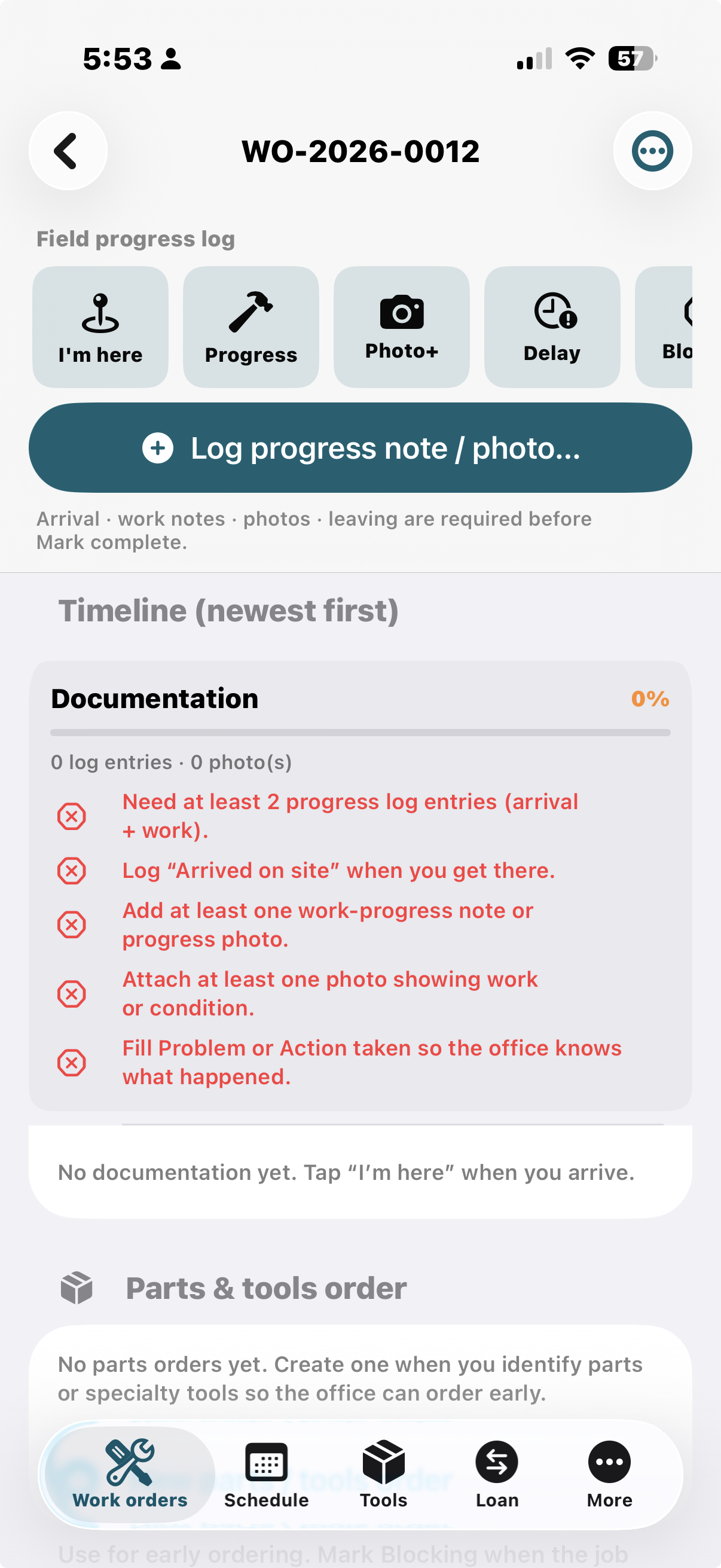
Each job is a work order for a customer boat appointment. The open ticket has Ticket, Timeline, and Signature tabs. Ticket keeps the job title, Work order (with Summary, a small Customer link, and the issuer), Type, a bordered who / where / when panel, and Ask the customer to sign. Signature is the finger pad — it asks as soon as you open that tab if they have not signed. The image prints on the work-order PDF. I’m here, Progress, Photo, Delay, Blocked, Leaving, and Note sit on the ticket. Parts & tools, Marine survey, Haul and paint, Diagnostics, and Project cost items open from that screen. Timeline is notes, photos, and notation history. Summary (and ⋯ Timeline) opens the compact event list — tap a row to preview.
| Field area | Contents |
|---|---|
| Identity | Work order number (WO-YYYY-####), title, type |
| Assignment | Assignee name/phone, assigned-by, priority, schedule block |
| Place/time | Marina, slip, appointment |
| Vessel | Owner, boat name, make/model, HIN. Signature tab is a finger signature pad. |
| Type-specific | Claim #, referral partner, deposit, cancel reason |
| Diagnostics | Problem → Identification → Testing → Action → Handoff, plus marine diagnostic trees (propulsion, inverter/charger, fuel, zincs, thruster, cabin A/C, hull, standing and running rigging) |
| Costs | Line items: Expense, Parts, Labor, Service with running totals |
| Evidence | Timeline tab: notes, photos, and notation history (newest first, or oldest first, filter by type). Compact kind-and-time list is in Summary — tap a row to preview. I’m here, Progress, Photo, Delay, Blocked, and Leaving are on the ticket. Completion gates still apply. |
| Work order PDF with firm letterhead (name, address, phone, email, prepared-by) and the customer signature when captured | |
| Lifecycle | Created → Pending → Complete → Archived |
Workflow enforcement (vetting)
Documentation score and red blockers prevent Mark complete until minimum field evidence exists. Use one free-tier ticket to vet a contractor or new hire: candidate or fail — so you avoid hiring or retaining unproductive labor.
Marketing deep-dive: contractor-trial.html.
Work order types
| Type | Intent |
|---|---|
| Service call | Standard dockside / shop repair |
| Insurance claim | Damage documentation for underwriter |
| Deposit / hold | Scope held against deposit |
| Cancellation | Cancel reason, fees, confirmation |
| Referral | Hand to partner shop |
| Yard handoff | Open items for yard or next shift |
| Abandoned | Incomplete work with recovery notes |
| Marine survey | Links to full survey module |
| Warranty | Follow-up on prior work |
| Estimate only | No repair authorization |
| Emergency | Priority call-out |
| Winterize | Lay-up: fuel, zincs, seacocks, batteries; haul-and-paint if hauled |
| Splash / launch | Commissioning: systems live, zincs, inverter, A/C, thruster |
| Other | General |
Schedule (manager board)
- Week / month / day board
- Tap a job on the calendar to open the work order
- Drag a job to another day — time of day is kept
- Wide swimlanes (iPad + Mac Catalyst) by assignee (who) with cards for what (type/title) and where (marina/slip)
- Assign sheet: create + optionally share work order immediately
Marine diagnostic trees
More → Diagnostics (also from the job). Phone trees:
- Propulsion — outboard, diesel, sterndrive / gear
- Power — 12V / shore / ELCI, generator, inverter/charger
- Pumps & plumbing — bilge, freshwater, head / sanitation
- Fuel — starvation, water in fuel, leak, vent
- Deck & control — steering, windlass, bow/stern thruster
- Rigging — standing (stays, shrouds, terminals, chainplates), running (halyards, sheets, winches, blocks, reefing/furling)
- Climate — refrigeration, cabin A/C
- Hull & running gear — seacock / thru-hull, stuffing box / shaft, zincs / anodes
Each path ends in a finding you append onto the work order.
Haul-and-paint checklist
On the job (and PDF): wash / pressure, zincs / anodes, bottom paint, running gear, block plan. Winterize and splash tickets surface it after a haul. Insurance claim packets include a one-page claim cover (peril, date of loss, HIN, photo index) plus the work-order and survey PDFs.
Bookkeeper export
Jobs → … → Export spreadsheet & letterhead PDF (or More → Storage):
- Excel
.xlsx— sheets Jobs, Lines, Hours (money and hours, no photos) MST-QB-Lines.csv— QuickBooks Online invoice columns- Letterhead PDF — firm logo/name from More → Firm; labor hours and clocked hours (I’m here → Leaving)
Labor quantity is hours. Single-job Export PDF (letterhead) on the work order still includes photos and diagnostics.
Platforms
| Device | Layout | Typical user |
|---|---|---|
| iPhone | Bottom tabs: Jobs · Schedule · Survey · Tools · More | Field personnel |
| iPad | Upper tab bar (iOS 18+) + schedule board | Manager |
| Mac | Mac Catalyst, upper tab bar, large default window | Office / boss desktop |
Work-order transfer (manager ↔ worker)
Portable records:
| Direction | Action |
|---|---|
| Manager → worker | Export .msworkorder → Messages / Mail / AirDrop |
| Worker receives | Open the file in MarineServiceTech (or More → Transfer → Import) — that is the transfer |
| Worker → manager | Select jobs → field return package → share back |
Nothing is overwritten. Photos, progress log, costs, and diagnostic findings merge by id.
Format: JSON, extension msworkorder, UTI com.grego.marineservicetech.workorder.
Data & storage
More → Storage — bytes for work orders vs photos, export with or without photos, strip photos, delete archived. Put the .msworkorder archive on iCloud Drive (Files) before stripping the phone. Job photos are not in iCloud Photos.
Tools inventory
Locations (Service van, Shop, Toolbox, custom) and tool items with qty, serial, notes. Clean install has no demo tools.
Appointment customer text (1 hour before)
While the app is running, if the tech (Firm & tech profile name) has a ticketed assignment with an appointment today, about one hour before a sheet prompts Send message to customer with three canned SMS options:
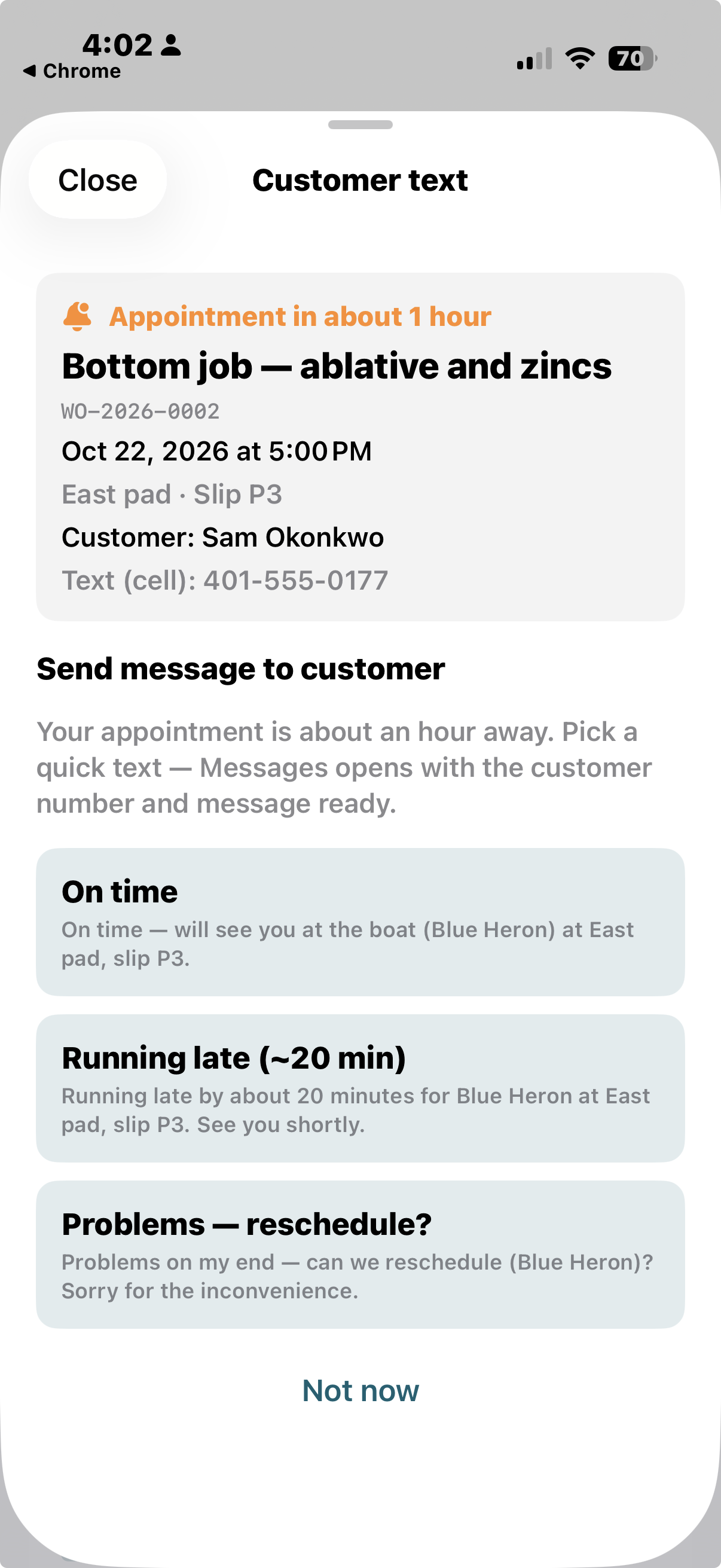
- On time — will see you at the boat
- Running late (~20 min)
- Problems — reschedule?
Uses the work order’s customer phone field when set. “Not now” dismisses without re-nagging for that appointment.
Loan / Borrow
More → Loan — a memory ledger for gear and consumables that move between people (not stock counts). Track Loaned Out vs Borrowed, person, notes, optional photo and reminder, mark returned. Marine Survey is a top-tier tab.
Example: loan Tony Soprano 3 rolls of plastic tarp. Footnote: probably not gonna get this back.. — record it anyway so you remember who took how many.
Full guide: Loan / Borrow documentation.
Marine surveys
Thorough visual-inspection model aligned with common C&V / insurance practice:
- Types: Condition & Value, Pre-Purchase, Insurance Claim, Storm, Salvage, Reinspection, Finance, Damage appraisal
- Exposure: In Water / Out of Water (filters sea trial vs bottom)
- Subsystems: identification, hull, bottom, zincs/bonding, deck, standing rigging, running rigging, sails/canvas, propulsion, fuel, electrical, plumbing, nav, safety, ground tackle, steering, thruster, comfort (A/C + refrigeration), sea trial, valuation, claim narrative
- Per-step rating + dictation notes + completion progress
- Parties: insurer, claim #, peril, surveyor credentials
- Default limitations / scope disclaimer text for professional use
Surveys are not a warranty of condition; limitations language is built in.
Weather map & navigation charts
Weather map (More → Weather map):
| Mode | Layers |
|---|---|
| Weather | Animated NEXRAD reflectivity loop (precip), surface temperature, watches/warnings |
| USN | NOAA ENC depth & aids (U.S.); GEBCO / EMODnet bathymetry + OpenSeaMap seamarks (tropics / global free) |
Map settings (More → Map settings): default radar center (GPS or coastal catalog), animate radar loop, chart region (Auto / U.S. NOAA / Tropics / Global free), lock chart overlays during pan. Not for primary navigation.
Dictation
Memo dictation panel plus mic-enabled work-order, diagnostic, and survey fields (Speech framework). Spanish dictation (ES → EN) transcribes on the iPhone and stores English notes on the ticket.
Full iPhone walkthrough: Spanish dictation, English on the ticket — keyboard, Dictation Languages, Translate packs, in-app mic, and what the yard office reads.
Set up Spanish → English notes
Spanish does not appear under Settings → General → Keyboard → Dictation Languages until you add a Spanish keyboard. MarineServiceTech cannot add that language for you. Do not change Settings → General → Language & Region — that only changes iPhone menus. Use shop Wi-Fi. The in-app screen More → Note dictation language links each Apple page below.
On the iPhone
- Add a Spanish keyboard. Settings → General → Keyboard → Keyboards → Add New Keyboard → Spanish (Mexico) (or Spanish (Spain)). Apple’s steps: Add or change keyboards.
- Turn Enable Dictation on. Back to Settings → General → Keyboard. Apple’s steps: Dictate text.
- Download Spanish under Dictation Languages (on some iOS versions: Keyboard → Dictation → Languages). Spanish only appears after step 1.
- Download Spanish ↔ English Translate languages on shop Wi-Fi. Apple’s steps: Translate text in apps. If the in-app download fails, install Apple Translate and retry.
In MarineServiceTech
- Open More → Field helpers → Note dictation language (or More → Help → Spanish → English phone setup).
- Set Note dictation to Spanish → English.
- On iOS 26, tap Download Spanish speech on that screen. On iOS 17–25, speech packs come from Settings (steps 1–3 above). Then download Translate packs on the same screen (iOS 18+).
After that, speak Spanish into a work-order note field. English is what lands on the ticket. Offline English insert needs iOS 18+ with those packs already downloaded.
Listen to a note (English ticket → Spanish spoken)
Problem, Identification, Handoff, haul-out, blocking, progress, estimate, and other narrative fields keep English on the ticket. A small speaker icon on the field (and on the job’s diagnostic blocks) opens a panel:
- If Spanish Translate packs and a Spanish voice are on the phone, the panel shows the note in Spanish and reads it aloud.
- If those packs or a Spanish keyboard/voice are missing, the same panel shows the English and reads the English.
Spanish from this panel is not saved on the work order. Download Translate packs on shop Wi-Fi the same way as dictation if you want the spoken Spanish.
Firm profile
Firm name, tech name, phone, email, and optional logo/sign photo — used on PDF letterhead and assignment stamps.
Freemium (work-order transactions)
| Tier | Access |
|---|---|
| Free | First 12 work orders (a dozen) created or imported as net-new; view/edit/complete |
| Premium | Unlimited work orders (monthly/annual subscription) |
Paywall is wrapped around creating work orders (Jobs +, Schedule Assign, import inserts).
Data & storage (About)
More → Data & storage shows on-device memory by category (job photos, progress photos, job data, export/PDF cache, firm logo, surveys, tools) and actions to free space:
- Export dataset (complete/archived or all) as
.msworkorder - Strip photos from complete & archived jobs
- Clear export cache / temp PDFs
- Delete archived work orders