Created at the desk
Someone at the firm opens the work order. They pick a customer already on file, or they type a new name, phone, and email. They name the vessel (on ServiceValet, the job site), the kind of work, where to meet, and the problem as it was told to them.
The host assigns the work-order number. That number stays the firm’s own number. The ticket is now a record the office can edit. It reaches a phone only when the office sends it.
Created by the customer
The office does not have to type the story. It sends the customer a link. The customer opens it and, in that same session, enters the information and uploads the pictures. Submit creates the work order. The link is used once.
- Who they are: name, mobile, email, address.
- The vessel: boat name, make and model, HIN, marina, slip. A ServiceValet job site is the same idea.
- The work: kind of work, a short title, what needs to be done, and service history.
- Photos and PDFs in the same sitting: damage, gear, surveys, invoices, or a prior work order. Those files land on the new ticket.
The office still reviews the result. The customer’s words and photos are the starting record, not a side email that can get lost.
Reviewed and edited
After either kind of create, management reads the ticket before anyone is sent to the boat. Three things get settled here.
- Clarity. The problem and the services requested are rewritten so a technician can act on them. Vague “it doesn’t work” becomes the system, the symptom, and what the customer asked for.
- Scheduling. The office decides whether this job is ready for a day and a time, or whether it waits.
- Parts. Anything that should be on the truck before the appointment is requisitioned from this pass, not discovered on the dock with the customer watching.
Date, time, and technicians
The work order is given a date and a time. One technician, or several, are assigned to that same ticket. Adding a person does not replace the people already on it.
Those names are who the day-before reminder will mention, who gets the one-hour prompt on the phone, and whose time will show on the clock. Meet-at is set with the appointment: the dock, the yard, or another place the customer can find.
Reminder the day before
The day before the appointment the customer is sent an email and a text. The message says when, where to meet, and the names and numbers of the workers who are coming.
It is written on the ticket’s communications log as outbound mail, so the next person at the desk can see that the reminder went out. There is no separate “send reminder” button to remember.
One hour before
About one hour before the appointment, the phone opens Customer text. The worker picks one message. Messages opens with the cell number on the work order and those words already written. ServiceValet writes the job site into those texts. This picture is the MarineServiceTech phone on a boat job.
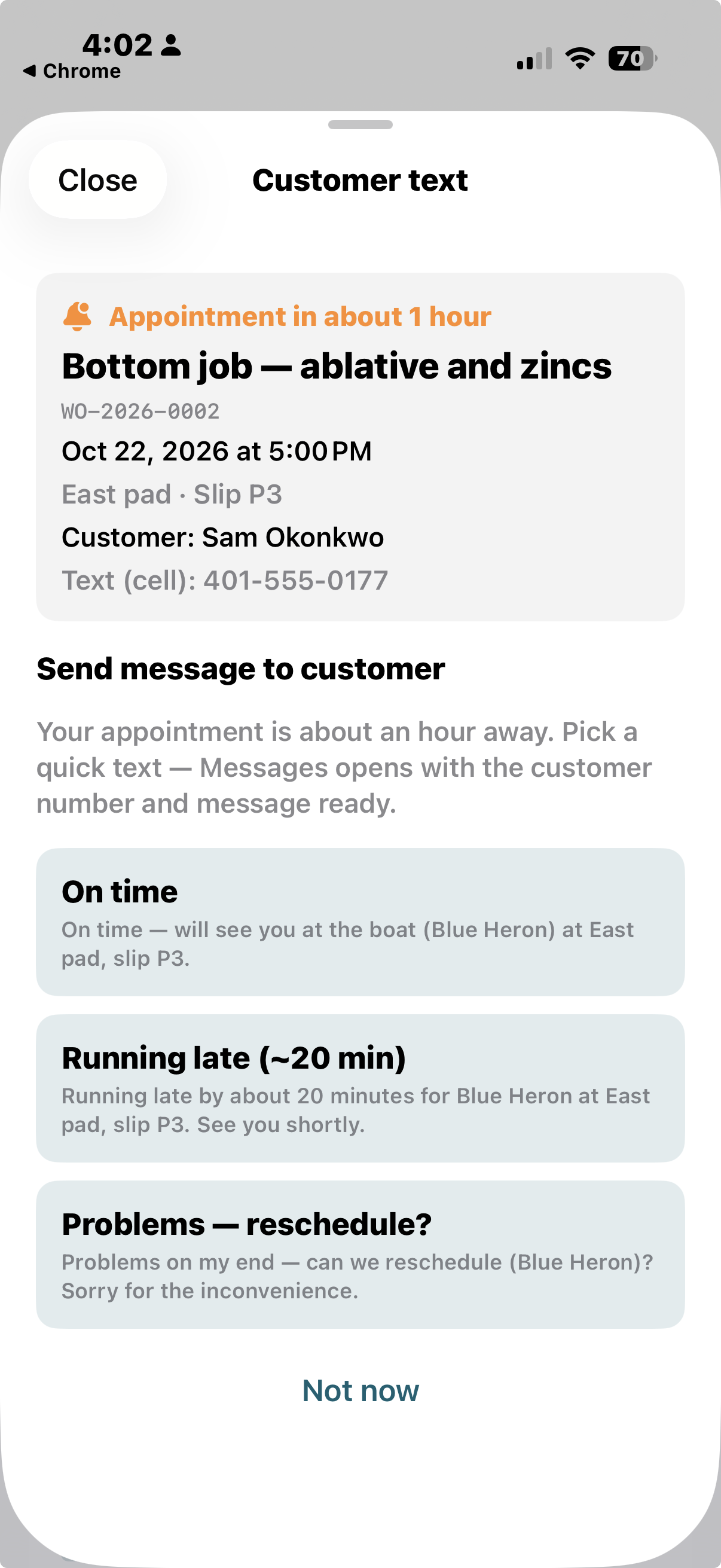
- On time. The text says the worker will be there as scheduled.
- Running late (~20 min). The text says they are about 20 minutes late.
- Problems — reschedule? The text asks to move the appointment.
The worker sends that text from their own phone. Not now dismisses the sheet for this appointment.
I’m here
When the worker arrives at the job on the ticket, they tap I’m here. That is the start of the time clock for this stretch.
They look at the working conditions first: access, weather, the state of the gear, anything that will change how the job goes. Then they photograph the work at every stage, starting with what they found. The photos stay on the work order with the time they were taken.
Leaving
A lunch break, a parts run, or the end of the day on that boat: the worker taps Leaving. The clock for that stretch stops.
Coming back is another I’m here. Each stretch is kept. The work order can show the morning, the gap, and the afternoon as separate time, not one blur from arrival to dark.
Progress and photos
If time was spent on the ticket, the worker owes an update: what changed, and photos of it. That continues for as long as they are actively working the ticket, until the job is finished.
A stretch with hours and no update is a hole. The next person, and the invoice, should not have to guess what happened between arrival and departure.
Blocked
The vessel is locked, the yard gate is shut, or the work cannot be reached. The worker taps Blocked and states the update: what stopped the job, and what has to change before it can start.
The office sees that on the ticket. Silence does not get read later as “the tech never showed up.”
Parts to the office
When the job needs parts, they are entered on the ticket and sent in with the work the phone returns to the office. The line says what it is. The office requisitions from that list.
Those lines stay on the work order. They are the same lines the invoice will use, so the part that was asked for and the part that was billed are one record.
Delay
When the job stalls, the worker taps Delay, dictates the reason, and adds a photo. Waiting on a haul, a seized fastener, weather, a customer who stepped away: the cause is on the ticket while it is still true.
The dictated note is stored in English, even when it was spoken in Spanish. The photo shows the condition that caused the wait.
Spanish in, English saved
The worker may dictate in Spanish. The phone translates the note, and the work order saves English.
Office review, the next technician, and the invoice all read the same language. The speaker does not have to type English on the dock for the record to be usable at the desk.
Diagnostic wizards
The work order carries more than twenty diagnostic trees for the tracks technicians repeat. Cabin air conditioning, diesel, outboard ignition and the rest of propulsion, electrical power, fuel, pumps, steering, rigging, refrigeration, and hull gear are in that set. Each path ends in a finding.
The technician runs the tree on the phone. The finding is appended to the work order, with the notes and the photos. It is not a clipboard sheet that never meets the invoice. On ServiceValet, the firm’s trade workflows land on the ticket the same way: the result is part of the work order.
Time clock and cost
At the end of the day, or at the end of the project, the ticket holds two accountings.
- Time. Each worker’s clock, from I’m here to Leaving, including a return after lunch. A shared ticket keeps a separate clock per person.
- Cost. Hours and money for the tasks and trades on the job: labor, parts, and the other lines entered in the field or at the desk. Management can see what each phase of the work took.
Check-in hours are the attendance record. The labor line is the cost figure. Both stay on the work order.
Work is complete
The job is complete when the physical work is done and the work order shows the time and the assignment of everyone who did it. Photos, progress, delays, blocked time, parts, and diagnostic findings are already on that document.
When more than one worker is assigned, closing the ticket is an office decision. One phone return does not erase another person’s notes or clock.
The finished work order is reviewed
Management reads the completed work order before any bill is written. The review is the document itself: the problem, what was found, the diagnostic findings, the photos at each stage, the time clocks, and which workers did the physical work.
Questions get settled against that record. The invoice is the next step, and it is prepared from this reading, not from memory of the phone call that opened the job.
Invoice from the work order
The invoice is prepared to reflect what the work order outlines. Labor hours, parts, and the tasks that were done are the lines. A package the firm uses often can be added, and it lands on the same cost list.
If the work order does not say it, it is not a line the customer has to take on faith. The bill and the ticket tell the same story.
The photos answer the money questions
Questions show up after the job: Was the work harder than it looked? Did the conditions change? Why did this task take that long? Why this part?
The photos, the dictated notes, the diagnostic findings, and the clocks are the facts. They were written while the work was happening. That record is what cuts down arguments about performance, difficulty, complexity, and the money.